Mobile follows anywhere.
Desktop goes deeper.
Follow live chess anywhere.
Quick access to favorite events, players, notifications, and games when you are away from the desk.
Work with more context.
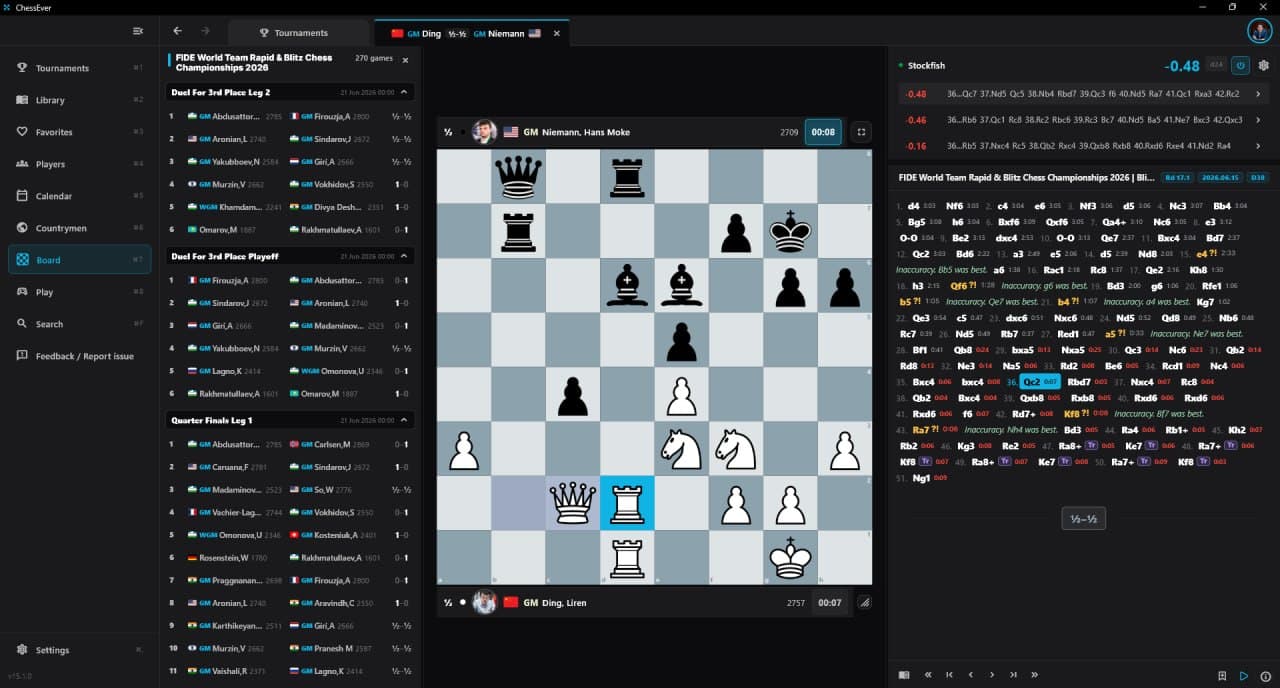
A bigger board, full notation, game lists, event context, engine information, and database tools in one serious workspace.
Live event workspace
Follow tournaments with the board, notation, event context, and game list visible together. Desktop is built for watching more than one game seriously.
Database + PGN workflow
Import PGN files, browse and search games, save analysis, and organize your chess work in a database-style interface.
Opening explorer + preparation
Explore positions, build opening trees, and prepare against players with a layout made for longer analysis sessions.
Bigger board, less friction
Desktop gives chess the space it needs: board, clocks, engine lines, comments, variations, and game context without constant screen switching.
Built around live chess
ChessEver Desktop is not only a static database. It is designed around following live events and studying the games afterwards.
Connected to Premium
One ChessEver Premium plan unlocks the full phone, desktop, and web experience across every ChessEver surface.
For players, coaches, streamers, and fans.
ChessEver Desktop is for people who want more than a quick glance at a single board. It is a workspace for following events, reviewing games, and organizing chess knowledge.
Fans
Follow favorite players and events on a bigger screen with board and context open.
Players
Review games, explore positions, and build a practical study workflow.
Coaches
Organize PGNs, prepare material, and move between games quickly.
Creators
Use a cleaner desktop workspace while following live boards and tournament stories.
From live event
to saved study.
Desktop should make ChessEver feel like a serious product category: follow, open, analyze, save, and return later.
Follow event
Start from live tournaments, favorite players, or event pages.
Open game
Use the full board workspace with notation and context visible.
Analyze
Study moves, engine lines, comments, and position details.
Save / import
Keep games in your database workflow and continue later.
Desktop is part of ChessEver Premium.
One subscription unlocks iOS, Android, desktop, and web. Desktop is where ChessEver becomes a serious chess-following and database workspace, not just another download button.
See PremiumFollow, analyze, organize.
Install ChessEver Desktop.
Dedicated desktop downloads for macOS, Windows, and Linux. The Windows installer keeps the existing Windows Defender guidance.
Desktop questions,
answered clearly.
01Is ChessEver Desktop available for macOS?
Yes. ChessEver Desktop is available for macOS. The download is designed for Mac users who want a bigger-screen workspace for following tournaments, analyzing games, and managing chess study.
02Is ChessEver Desktop a ChessBase alternative?
Yes — ChessEver Desktop is an alternative for players who want the essential ChessBase-style functions in a modern live-chess product: database browsing, PGN import, search, analysis, opening exploration, and especially player preparation. It is not a ChessBase clone; it is a live-event and preparation workspace built around how ChessEver users follow chess.
03Can I use ChessEver Desktop as a chess database?
Yes. ChessEver Desktop includes database-style workflows for organizing, searching, importing, and studying games. The goal is to make the core database work feel practical without turning the product into old, heavy chess software.
04Can I follow live tournaments on ChessEver Desktop?
Yes. Following live tournaments is one of the main reasons ChessEver Desktop exists. The desktop layout gives more room for the board, notation, event context, engine information, and game lists at the same time.
05Can I import PGN files into ChessEver Desktop?
Yes. ChessEver Desktop is designed for PGN import, browsing, search, and analysis workflows, so players and coaches can bring their own games into the same workspace.
06Is ChessEver Desktop free?
No. ChessEver Desktop is part of the ChessEver Premium plan, which includes the full phone and desktop experience across iOS, Android, desktop, and web.
07Is ChessEver Desktop available for Windows?
Yes. ChessEver Desktop is available for Windows through the desktop installer.
08Is ChessEver Desktop available for Linux?
Yes. ChessEver Desktop is available as a .deb package for Debian/Ubuntu-based Linux distributions.